
Emergency communication apps are tools that help schools share alerts and safety information instantly during crises. Apps such as Rave Panic Button, CrisisGo, and SchoolGuard are commonly used across North America to improve school response times. I also found that the University of Calgary has an app like this that is called the UCSafety app. These apps allow teachers or staff to send emergency messages to everyone in the school wth just one tap. These apps can contact emergency services, alert other staff members, and give real time updates. All of which helps schools respond faster and more effectively in dangerous situations.
These tools make a big difference in how schools handle emergencies. Instead of relying on loudspeakers or long phone calls, communication apps allow you to contact emergency services a lot faster and easier.
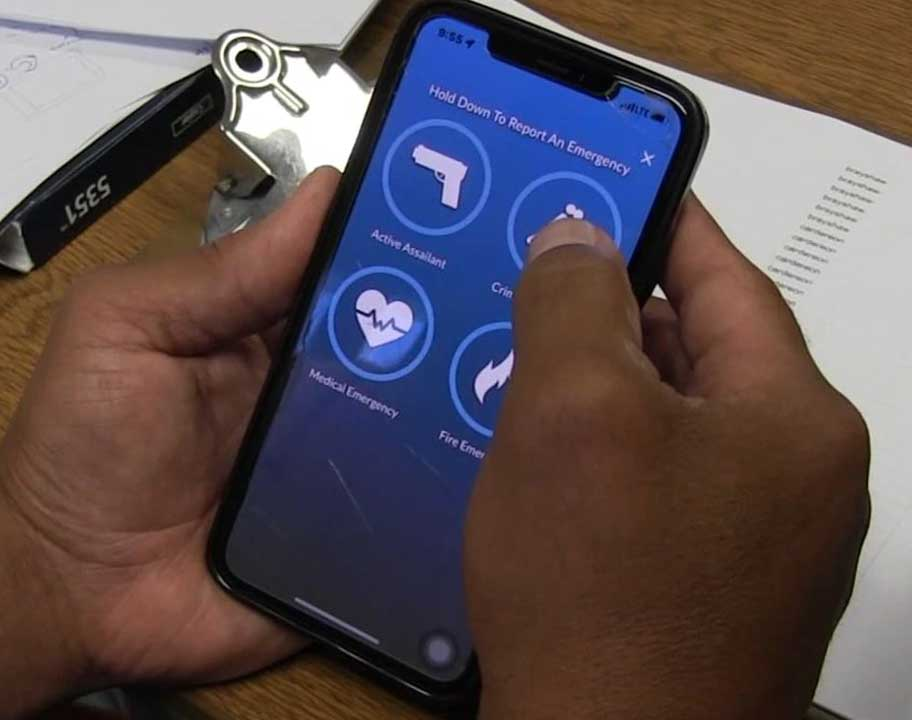
Photo by SaferWatch

Rave Panic Button
The Rave Panic Button app allows staff and authorized users to instantly connect with 911, on-site personnel, and first responders when an emergency arises. With the press of a button, the app instantly shares key information—location, building details, and the type of emergency — with both 911 dispatchers and school administrators. For example, in one case study at a school in Eaton County, Michigan, this app allowed a principal to activate an alert from his mobile device even when he was away from his office and immediately notified the correct staff and 911 of a student who had a weapon. Even though the principal was not in his office, he was able to advise his staff that the school was entering lockdown mode. The Rave Panic Button app exemplifies how communication apps can support school safety by connecting technology, staff training, and emergency response all on one platform.
Crisis Go
CrisisGo offers a unified safety and communication tool designed for K-12 schools. Offering features like mass alerts, incident/tip reporting (including anonymous submissions), digital check-ins, and a virtual command center, this app supports schools through the full cycle of emergency management: prepare, respond, recover. An example of its innovation is the launch of CrisisGo Connect, which enables schools and public safety agencies to collaborate in real time, sharing maps, live status updates and two-way communication during a major incident. From an educational standpoint, this app allows schools to integrate drills, monitor responses, and streamline communication for students and staff, enhancing readiness and coordination. How CrisisGo Connects School Districts and First Responders

SchoolGuard
SchoolGuard is a mobile panic button app developed for K-12 school staff, enabling them to instantly notify law enforcement and school administrators in the event of an active emergency. According to the App Store description, when the button is pressed, the app dials 911 and sends an alert to nearby law enforcement officers who are a part of the Hero911 Network, as well as to all staff of the school and other protected schools within a defined radius. For schools focused on improving response times, SchoolGuard represents an example of how communication technology can be used in extremely high risk situations.

UCSafety
The University of Calgary uses the UCSafety mobile app to promote student, staff, and visitor safety across campus. The app delivers emergency alerts, provides incident reporting tools, and includes features like working alone and friend walk, which allow users to check in or share their real-time location during solo activities. By combining multiple safety features into a single platform, UCSafety enables faster communication during emergencies while supporting a safe learning environment. Privacy is considered carefully, location tracking only activates for certain features, and personal data access is limited. This Canadian example shows how a school can integrate emergency communication, monitoring, and reporting into a single app, improving preparedness while balancing privacy and accessibility concerns.
Teaching and Learning

Photo by Pixabay on Pixels.
These apps support teaching and learning by creating a safer, more prepared school environment. When students and teachers know there is a clear and reliable emergency communication system in place, they can focus more on learning. Teachers can also use these apps during safety drills to teach students how to respond calmly and appropriately during an emergency.
When students and teachers feel safe, they can focus more on learning. Emergency communication apps reduce fear and uncertainty by giving staff a sense of control during emergencies.
By making communication faster and more reliable, these apps support a positive, focused learning environment, where everyone feels prepared and protected.
Emergency Communication Apps: What You Need to Know
Pros, Cons, and Risks
Pros

Photo by Mika Baumeister on Unsplash.
- Immediate alerts.
- Direct communication with responders.
- Location tracking
- Incident reporting.
- Peace of mind.
- Builds trust and preparedness among students and staff.
Cons

Photo by Markus Spiske on Unsplash.
- May not work if there is an internet or power outage.
- False sense of security, students may rely on the app instead of taking immediate action.
- User errors.
- Location inaccuracies.
- Battery drain
- Over-reliance on technology.
- Technical failures.
- Requires training and regular testing to be effective.
- It can be costly for some schools to implement.
Risks

Photo by Dave Photoz on Unsplash.
- Potential privacy and data protection issues.
- Unequal access if some staff or students don’t have compatible devices.
- Possible false alarms that could create panic.
- Technical failures.
- Students could delete the app or never update it, which could cause failures during emergencies.
- User errors.

Photo by Startaê Team on Unsplash.
Best Practices and Strategies
- Provide regular training for teachers, students, and staff to know what to do on the app in case of an emergency.
- Run drills to ensure the app works properly and everyone knows the procedure.
- Keep the app updated.
- Don’t rely solely on the app.
- Keep contact information updated for quick notifications.
- Choose secure apps that protect user data and comply with privacy laws.
- Promote open communication so students feel comfortable reporting safety concerns.

Photo by cottonbro studio on Pixels.
Emergency communication apps are powerful tools that help schools respond quickly and effectively during emergencies. They improve safety by allowing instant communication between staff, students, and emergency responders. However, for these apps to truly enhance school safety, they must be supported by regular training, strong privacy protections, and equal access for everyone. When used thoughtfully, these apps build confidence, reduce panic, and create a safer, more prepared learning environment.

Sorry, but comments are not enabled on this site.